Blogs

Meera Prince
7 minuters läsning
Introduction:
Ajax Push is a mechanism to push data from server. Generally in the web application when the client request for the server then we will get the dynamic data or updated data from server to web client/browser.
But sometimes we need a mechanism it automatically push data from server to client this is called server push mechanism. Server push is technique to push data from server to client. In this scenarios client will not send request to server but server will automatically push the data to client when it get updated.
To make it work server push technique we will use one protocol called
Bayeux protocol.
Bayeux:
Bayeux is a protocol for transporting asynchronous messages (primarily over HTTP), with low latency between a web server and a web client. The messages are routed via named channels and can be delivered
We can use protocol for server to client, client to server, client to client (via the server)
The primary purpose of Bayeux is to support responsive bidirectional interactions between web clients, for example using AJAX, and the web server.
Here we will produce data on some channels and client will subscribe channels. When client subscribe channeled as soon as data published on channels will aquatically reached the client who are subscribed channels.
CometD
CometD is a scalable HTTP-based event routing bus that uses a Ajax Push technology pattern known as Comet
CometD is a Dojo Foundation project to provide implementations of the Bayeux protocol in JavaScript, java, Perl, python and other languages. Other organizations (eg. Sun, IBM and BEA) also have implementations of Bayeux that are not strictly part of the CometD project, but where possible they are linked to from this site.
Environment:
Liferay 6.2 +Tomcat 7.x+MySQL 5.1
Note:
The code will work for portal 6.2 version you can try for 6.1 too.
Download
Liferay CometD Ajax Push Portlet from following location
You can find source and war file
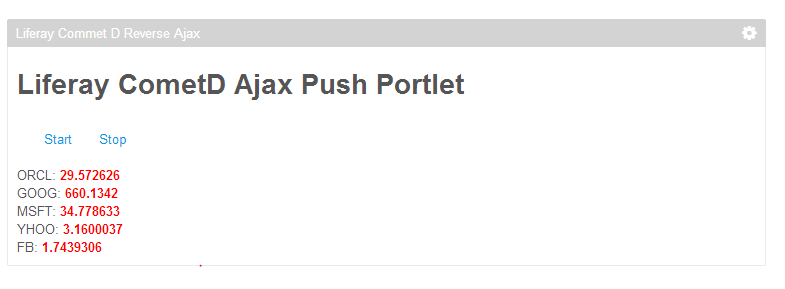
Portlet Screen-1:
Procedure for deploy portlet ans Use:
You can use war file and directly place in your portal deploy folder and test or you can also use source to deploy portlet.
Once portlet is deployed successfully you can see the portlet in
samplecategory name as
Liferay Commet D Reverse Ajax.
As soon as you place the portlet in page you can see updated stock prices for every few seconds and it will be updated automatically.
You can also open portlet in another browser there also you can see price changes automatically.
Note:
Before use this portlet please Read entire Article and Use it
Implementation:
We will use
Bayeux java implementation for produce data on channels.
Once data produced on channels we will use CometD java script implementation to get the data to client automatically. We have Dojo and JQuery java script implementation for
CometD.
Using ComedD Ajax Push in Liferay Portlet
- Configure CometD servlet in portlet web.xml
- Implement Data Producer to produce data
- Implement Service to publish data on Channels Using Bayeux
- Use CometD java script in client side to subscribe channel and show data.
Concept:
We will take an example of stock prices updates so that we will send stock price changes to client when changes in price changes in stocks.
We will use Java Scheduler to produce data for every few second from server side and as soon as data produced we will use CometD service to publish data on channels.
In the client side we will use CometD JQuery to subscribe the channels and show the stock price changes.
Configure CometD servlet in portlet web.xml
We need configure CometD servlet to initiate all the process. We have different servlets one of the servlet
AnnotationCometdServlet and need to pass CometD service as init parameter.
The following is code snippet
|
<servlet>
<servlet-name>
cometd</servlet-name>
<servlet-class>org.cometd.annotation.AnnotationCometdServlet</servlet-class>
<init-param>
<param-name>transports</param-name>
<param-value>org.cometd.websocket.server.WebSocketTransport</param-value>
</init-param>
<init-param>
<param-name>services</param-name>
<param-value>com.meera.commetd.StockPriceService</param-value>
</init-param>
<init-param>
<param-name>maxLazyTimeout</param-name>
<param-value>2000</param-value>
</init-param>
<load-on-startup>1</load-on-startup>
</servlet>
<servlet-mapping>
<servlet-name>
cometd</servlet-name>
<url-pattern>/
cometd/*</url-pattern>
</servlet-mapping>
|
Implement Data Producer to produce data
We already we need some source need to generate data so we will use some java class to produce data.
We will randomly generate some price for stock quotes and we have used Scheduler Executer to run this task for every few seconds. We have used
StockPriceEmitter java class
Implement Service to publish data on Channels Using Bayeux
We need service that responsible for publish data on channels with the help of Bayeux protocol. We need create channel and then need to publish
The following example syntax to create channel and publish
Create channel
|
bayeuxServer.createChannelIfAbsent(channelName,
newConfigurableServerChannel.Initializer()
{
public
void configureChannel(ConfigurableServerChannel channel)
{
channel.setPersistent(
true);
channel.setLazy(
true);
}
});
|
Publish data on channel
|
ServerChannel channel = bayeuxServer.getChannel(channelName);
channel.publish(sender, data);
|
Use CometD java script in client side to subscribe channel and show data
In the client side will use CometD java script implementation to subscribe channel and show the data.
We need configure CometD servlet URL and need to add two leisters to make hand shake with server.
The following syntax
|
var cometURL = location.protocol + "//" + location.host + config.contextPath + "/cometd";
cometd.configure({
url: cometURL,
logLevel: 'debug'
});
cometd.addListener('/meta/handshake', _metaHandshake);
cometd.addListener('/meta/connect', _metaConnect);
cometd.handshake();
|
Subscribe Channel Syntax
|
cometd.subscribe('/stock/*',
function(message)
{
var data = message.data;
});
|
Note:
We need add CometD java script implementation source in page and we will use cometd is java script object available to call methods.
We have implement application related java script in application.js
The following are all required java script source files
|
<scriptsrc=
"http://ajax.googleapis.com/ajax/libs/jquery/1.11.0/jquery.min.js"></script>
<script type=
"text/javascript" src=
"<%=renderRequest.getContextPath() %>
/js/comet/cometd-namespace.js"></script>
<script type=
"text/javascript" src=
"<%=renderRequest.getContextPath() %>
/js/comet/cometd-json.js"></script>
<script type=
"text/javascript" src=
"<%=renderRequest.getContextPath() %>
/js/comet/AckExtension.js"></script>
<script type=
"text/javascript" src=
"<%=renderRequest.getContextPath() %>
/js/comet/TransportRegistry.js"></script>
<script type=
"text/javascript" src=
"<%=renderRequest.getContextPath() %>
/js/comet/Transport.js"></script>
<script type=
"text/javascript" src=
"<%=renderRequest.getContextPath() %>
/js/comet/RequestTransport.js"></script>
<script type=
"text/javascript" src=
"<%=renderRequest.getContextPath() %>
/js/comet/WebSocketTransport.js"></script>
<script type=
"text/javascript" src=
"<%=renderRequest.getContextPath()%>
/js/comet/CallbackPollingTransport.js"></script>
<script type=
"text/javascript" src=
"<%=renderRequest.getContextPath() %>
/js/comet/LongPollingTransport.js"></script>
<script type=
"text/javascript" src=
"<%=renderRequest.getContextPath() %>
/js/comet/Utils.js"></script>
<script type=
"text/javascript" src=
"<%=renderRequest.getContextPath() %>
/js/comet/Cometd.js"></script>
<script type=
"text/javascript" src=
"<%=renderRequest.getContextPath() %>
/js/comet/jquery.cometd.js"></script>
<script type=
"text/javascript" src=
"<%=renderRequest.getContextPath() %>
/js/comet/application.js"></script>
|
Complete Source code for Implementation
The following is web.xml file
|
<web-app id=
"WebApp_ID" version=
"2.4"xmlns=
"http://java.sun.com/xml/ns/j2ee"
xmlns:xsi=
"http://www.w3.org/2001/XMLSchema-instance"
xsi:schemaLocation=
"http://java.sun.com/xml/ns/j2ee
http://java.sun.com/xml/ns/j2ee/web-app_2_4.xsd">
<display-name>LiferayCommetDRevserseAjax-
portlet</display-name>
<servlet>
<servlet-name>
cometd</servlet-name>
<servlet-class>org.cometd.annotation.AnnotationCometdServlet</servlet-class>
<init-param>
<param-name>transports</param-name>
<param-value>org.cometd.websocket.server.WebSocketTransport</param-value>
</init-param>
<init-param>
<param-name>services</param-name>
<param-value>com.meera.commetd.StockPriceService</param-value>
</init-param>
<init-param>
<param-name>maxLazyTimeout</param-name>
<param-value>2000</param-value>
</init-param>
<load-on-startup>1</load-on-startup>
</servlet>
<servlet-mapping>
<servlet-name>
cometd</servlet-name>
<url-pattern>/
cometd/*</url-pattern>
</servlet-mapping>
<filter>
<filter-name>cross-origin</filter-name>
<filter-class>org.eclipse.jetty.servlets.CrossOriginFilter</filter-class>
</filter>
<filter-mapping>
<filter-name>cross-origin</filter-name>
<url-pattern>/
cometd/*</url-pattern>
</filter-mapping>
<jsp-config>
<taglib>
<taglib-uri>http://java.sun.com/portlet_2_0</taglib-uri>
<taglib-location>
/WEB-INF/
tld/
liferay-portlet.tld
</taglib-location>
</taglib>
<taglib>
<taglib-uri>http://liferay.com/tld/aui</taglib-uri>
<taglib-location>/WEB-INF/
tld/aui.tld</taglib-location>
</taglib>
</jsp-config>
</web-app>
|
The following is StockPriceServiceJava Class
|
import java.util.HashMap;
import java.util.List;
import java.util.Locale;
import java.util.Map;
import javax.inject.Inject;
import org.cometd.annotation.Service;
import org.cometd.annotation.Session;
import org.cometd.bayeux.server.BayeuxServer;
import org.cometd.bayeux.server.ConfigurableServerChannel;
import org.cometd.bayeux.server.LocalSession;
import org.cometd.bayeux.server.ServerChannel;
@Service
public
class StockPriceService
implements StockPriceEmitter.Listener
{
@Inject
private BayeuxServer bayeuxServer;
@Session
private LocalSession sender;
public
void onUpdates(List<StockPriceEmitter.Update> updates)
{
for (StockPriceEmitter.Update update : updates)
{
// Create the channel name using the stock symbol
String channelName = "/stock/" + update.getSymbol().toLowerCase(Locale.
ENGLISH);
// Initialize the channel, making it persistent and lazy
bayeuxServer.createChannelIfAbsent(channelName,
newConfigurableServerChannel.Initializer()
{
public
void configureChannel(ConfigurableServerChannel channel)
{
channel.setPersistent(
true);
channel.setLazy(
true);
}
});
// Convert the Update business object to a CometD-friendly format
Map<String, Object> data =
new HashMap<String, Object>(4);
data.put("symbol", update.getSymbol());
data.put("oldValue", update.getOldValue());
data.put("newValue", update.getNewValue());
System.
out.println("===========================");
// Publish to all subscribers
ServerChannel channel =bayeuxServer.getChannel(channelName);
channel.publish(sender, data);
}
}
}
|
The following is StockPriceEmitter java class
|
import java.util.ArrayList;
import java.util.Arrays;
import java.util.EventListener;
import java.util.HashMap;
import java.util.List;
import java.util.Map;
import java.util.Random;
import java.util.concurrent.CopyOnWriteArrayList;
import java.util.concurrent.Executors;
import java.util.concurrent.ScheduledExecutorService;
import java.util.concurrent.TimeUnit;
public
class StockPriceEmitter
implements Runnable {
private
final ScheduledExecutorService scheduler = Executors
.
newSingleThreadScheduledExecutor();
private
final List<String> symbols =
new ArrayList<String>();
private
final Map<String, Float> values =
new HashMap<String, Float>();
private
final List<Listener> listeners =
newCopyOnWriteArrayList<Listener>();
public StockPriceEmitter() {
symbols.addAll(Arrays.
asList("ORCL", "MSFT", "GOOG","YHOO", "FB"));
values.put("ORCL", 29.94f);
values.put("MSFT", 27.10f);
values.put("GOOG", 655.37f);
values.put("YHOO", 17.82f);
values.put("FB", 21.33f);
}
public List<Listener> getListeners() {
return listeners;
}
public
void start() {
run();
}
public
void stop() {
scheduler.shutdownNow();
}
public
void run() {
Random random =
new Random();
List<Update> updates =
new ArrayList<Update>();
// Randomly choose how many stocks to update
int howMany = random.nextInt(symbols.size()) + 1;
for (
int i = 0; i < howMany; ++i) {
// Randomly choose which one to update
int which = random.nextInt(symbols.size());
String symbol = symbols.get(which);
float oldValue = values.get(symbol);
// Randomly choose how much to update
boolean sign = random.nextBoolean();
float howMuch = random.nextFloat();
float newValue = oldValue + (sign ? howMuch : -howMuch);
// Store the new value
values.put(symbol, newValue);
updates.add(
new Update(symbol, oldValue, newValue));
}
// Notify the listeners
for (Listener listener : listeners) {
listener.onUpdates(updates);
}
// Randomly choose how long for the next update
// We use a max delay of 1 second to simulate a high rate of updates
long howLong = random.nextInt(1000);
scheduler.schedule(
this, howLong, TimeUnit.
MILLISECONDS);
}
public
static
class Update {
private
final String symbol;
private
final
float oldValue;
private
final
float newValue;
public Update(String symbol,
float oldValue,
floatnewValue) {
this.symbol = symbol;
this.oldValue = oldValue;
this.newValue = newValue;
}
public String getSymbol() {
return symbol;
}
public
float getOldValue() {
return oldValue;
}
public
float getNewValue() {
return newValue;
}
}
public
interface Listener
extends EventListener {
void onUpdates(List<Update> updates);
}
}
|
The following is Liferay Portlet Class
|
import java.io.IOException;
import javax.portlet.ActionRequest;
import javax.portlet.ActionResponse;
import javax.portlet.PortletException;
import com.liferay.util.bridges.mvc.MVCPortlet;
public
class LiferayCommetDReverseAjax
extends MVCPortlet {
private StockPriceEmitter emitter;
public
void startStockUpdates(
ActionRequest actionRequest, ActionResponse actionResponse)
throws IOException, PortletException {
emitter =
new StockPriceEmitter();
StockPriceService service(StockPriceService)getPortletContext().
getAttribute(StockPriceService. class.getName());
// Register the service as a listener of the
emitter
emitter.getListeners().add(service);
// Start the
emitter
emitter.start();
}
public
void stopStockUpdates(
ActionRequest actionRequest, ActionResponse actionResponse)
throws IOException, PortletException {
//
emitter = new StockPriceEmitter();
emitter.stop();
}
}
|
The following is application.js code
|
(
function($)
{
var cometd = $.cometd;
//alert(
cometd);
$(document).ready(
function()
{
function _connectionEstablished()
{
$('#body').append('<div>CometD Connection Established</div>');
}
function _connectionBroken()
{
$('#body').append('<div>CometD Connection Broken</div>');
}
function _connectionClosed()
{
$('#body').append('<div>CometD Connection Closed</div>');
}
// Function that manages the connection status with the
Bayeuxserver
var _connected =
false;
function _metaConnect(message)
{
if (cometd.isDisconnected())
{
_connected =
false;
_connectionClosed();
return;
}
var wasConnected = _connected;
_connected = message.successful ===
true;
if (!wasConnected && _connected)
{
_connectionEstablished();
}
else
if (wasConnected && !_connected)
{
_connectionBroken();
}
}
// Function invoked when first contacting the server and
// when the server has lost the state of this client
function _metaHandshake(handshake)
{
if (handshake.successful ===
true)
{
cometd.batch(
function()
{
cometd.subscribe('/stock/*',
function(message)
{
var data = message.data;
var symbol = data.symbol;
var value = data.newValue;
// alert(symbol);
var id = 'stock_'+ symbol;
var symbolDiv=document.getElementById(id);
if (!symbolDiv)
{
symbolDiv = document.createElement('div');
symbolDiv.id =id;
document.getElementById('stocks').appendChild(symbolDiv);
}
symbolDiv.innerHTML = '<span class="symbol">' + symbol + ': <b>' + value + '</b></span>';
});
// Publish on a service channel since the message is for the server only
//cometd.publish('/stock/*', { name: 'World' });
});
}
}
// Disconnect when the page unloads
$(window).unload(
function()
{
cometd.disconnect(
true);
});
var cometURL = location.protocol + "//" + location.host + config.contextPath + "/cometd";
cometd.configure({
url: cometURL,
logLevel: 'debug'
});
cometd.addListener('/meta/handshake', _metaHandshake);
cometd.addListener('/meta/connect', _metaConnect);
cometd.handshake();
});
})(jQuery);
|
The following is portlet JSP page.
|
<%@ include file=
"init.jsp"%>
<scriptsrc=
"http://ajax.googleapis.com/ajax/libs/jquery/1.11.0/jquery.min.js"></script>
<script type=
"text/javascript" src=
"<%=renderRequest.getContextPath() %>
/js/comet/cometd-namespace.js"></script>
<script type=
"text/javascript" src=
"<%=renderRequest.getContextPath() %>
/js/comet/cometd-json.js"></script>
<script type=
"text/javascript" src=
"<%=renderRequest.getContextPath() %>
/js/comet/AckExtension.js"></script>
<script type=
"text/javascript" src=
"<%=renderRequest.getContextPath() %>
/js/comet/TransportRegistry.js"></script>
<script type=
"text/javascript" src=
"<%=renderRequest.getContextPath() %>
/js/comet/Transport.js"></script>
<script type=
"text/javascript" src=
"<%=renderRequest.getContextPath() %>
/js/comet/RequestTransport.js"></script>
<script type=
"text/javascript" src=
"<%=renderRequest.getContextPath() %>
/js/comet/WebSocketTransport.js"></script>
<script type=
"text/javascript" src=
"<%=renderRequest.getContextPath()%>
/js/comet/CallbackPollingTransport.js"></script>
<script type=
"text/javascript" src=
"<%=renderRequest.getContextPath() %>
/js/comet/LongPollingTransport.js"></script>
<script type=
"text/javascript" src=
"<%=renderRequest.getContextPath() %>
/js/comet/Utils.js"></script>
<script type=
"text/javascript" src=
"<%=renderRequest.getContextPath() %>
/js/comet/Cometd.js"></script>
<script type=
"text/javascript" src=
"<%=renderRequest.getContextPath() %>
/js/comet/jquery.cometd.js"></script>
<script type=
"text/javascript" src=
"<%=renderRequest.getContextPath() %>
/js/comet/application.js"></script>
<%--
The reason to use a JSP is that it is very easy to obtain server-side configuration
information (such as the contextPath) and pass it to the JavaScript environment on the client.
--%>
<style>
#stocks
.symbol
b{
color:
red;
}
#controler-table
td{
padding-left:
30px;
}
</style>
<script type=
"text/javascript">
var config = {
contextPath: '<%=renderRequest.getContextPath()%>'
};
</script>
<portlet:actionURL var=
"startStockUpdates" name=
"startStockUpdates">
</portlet:actionURL>
<portlet:actionURL var=
"stopStockUpdates" name=
"stopStockUpdates">
</portlet:actionURL>
<h2>
Liferay CometD
Ajax Push
Portlet</h2>
<br/>
<table id=
"controler-table">
<tr>
<td><a href=
"<%=startStockUpdates.toString()%>
">Start</a></td>
<td><a href=
"<%=stopStockUpdates.toString()%>
">Stop</a></td>
</tr>
</table>
<br/>
<div id=
"stocks"></div>
|
Author
Related Assets...
Inga resultat hittades
More Blog Entries...

Yasuyuki Takeo
oktober 10, 2026

Community
Company
Feedback