Blogs
Finally, Shared Design Resources Across Sites

David H Nebinger
I have been asking for something like Design Libraries in Liferay for years.
And I know I am not the only one.
Imagine you have a fragment that provides a standard hero, product card, call-to-action, navigation element, or some other piece of your organization's design. You use that fragment across ten sites.
Until now, those ten sites generally meant ten copies of that fragment.
Then somebody finds a bug.
Or the design team changes the markup.
Or accessibility requirements change.
Or somebody decides the component needs one more configuration option.
Now you have ten copies to update.
And, of course, they are not really ten identical copies anymore because someone changed the version in Site 4 six months ago, somebody fixed a problem directly in Site 7, and nobody remembers why Site 9 looks slightly different.
That is not reuse. That is duplication with a maintenance plan attached.
Design Libraries finally give us a better option.
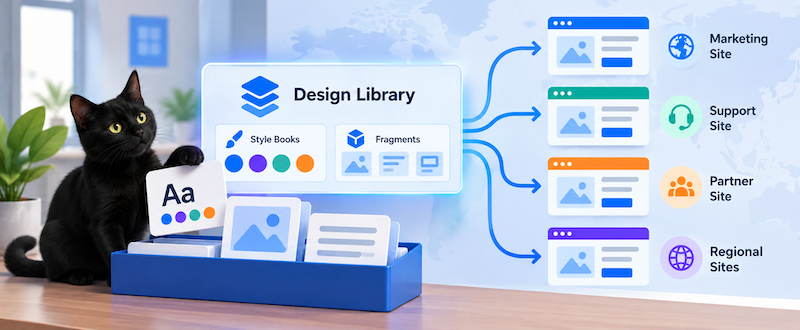
A Design Library is an instance-level container for design resources that can be shared by multiple sites. Today that means style books and page fragments, while each site can still maintain its own local style books and fragments alongside the shared resources.
That distinction is important. Design Libraries do not remove site-level design resources. They add another scope.
And that changes the architecture considerably.
We've Seen This Pattern Before
If the idea sounds familiar, it should.
Asset Libraries introduced the same general concept for content.
Instead of putting reusable content directly inside Site A and then discovering that Site B needs a copy, you can put that content somewhere independent of either site and connect both sites to it.
That is why I have recommended Asset Libraries even in implementations that initially have only one site.
If you know content is organizational rather than site-specific, storing it outside the site gives you a cleaner boundary from the beginning.
Today you may have:

Six months later somebody asks for:
Corporate Site
Partner Site
Support Site
Regional Site
If the content belongs to the Corporate Site, you now have a migration problem.
If it already lives independently:

there is nothing particularly special about adding another consumer.
Design Libraries bring that same architectural idea to design resources.
Asset Libraries let us centralize reusable content. Design Libraries let us centralize reusable design.
In fact, Liferay implements a Design Library as a type of Asset Library, which is why concepts such as independent membership, roles, and LAR import/export feel familiar.
The Problem Design Libraries Solve
Consider a company with twelve regional sites.
Each uses the same corporate header fragment.
Without a Design Library:

Every copy can drift independently.
With a Design Library:

The shared fragment is managed centrally.
The same applies to style books. A brand team can define a shared set of design tokens once and expose that style book to the sites that should use it.
When multiple sites share one visual identity, maintaining the same resources independently in every site leads to repeated changes and, eventually, divergence.
That is exactly the problem I have seen in real implementations.
Enabling Design Libraries
Design Libraries arrive in Liferay DXP 2026.Q3 as a release feature.
The current feature flag is:
LPD-57283
An instance administrator must enable it before the Design Libraries application appears.
Once enabled, Design Libraries is available from:
Global Menu
  -> Applications
    -> Design Libraries
I have been testing this on DXP 2026.Q3, and the supported use cases described in the documentation are working as advertised.
What Can a Design Library Contain?
In the initial implementation, Design Libraries support two major categories of design resources:
- Style Books
- Page Fragments
For fragments, you can create both basic fragments and form fragments. They use the same HTML, CSS, and JavaScript model used for site-level fragments.
Fragments continue to live inside fragment sets as they do today.
You can also:
- Create fragment sets
- Import fragments from ZIP files
- Export fragment sets
- Manage fragments from the library
- Publish fragments before exposing them to connected sites
There is one notable limitation: fragment compositions cannot currently live in a Design Library.
More on the broader set of design resources later.
Creating a Design Library
Creating one is straightforward.
From:
Global Menu
  -> Applications
    -> Design Libraries
select New Design Library.
A Design Library has:
- A name
- An optional description
- A Group ID assigned by Liferay
- An External Reference Code
The External Reference Code is particularly useful for automation and environment promotion because it can be used through headless APIs and to identify the corresponding library in another environment.
That matters if your deployment model looks something like:

Design Libraries also support Liferay's normal LAR export/import mechanism.
So these are not just convenient UI containers. They participate in the normal operational lifecycle we expect from Liferay resources.
Creating Shared Fragments
Inside the Design Library you can create a fragment much like you would inside a site.
For example:
<div class="shared-callout">
  <h2>Need Help?</h2>

  <p>
    Talk to one of our specialists.
  </p>

  <a class="btn btn-primary" href="${configuration.url}">
    ${configuration.label}
  </a>
</div>
Add the CSS, JavaScript, configuration, editable fields, mappings, and other fragment capabilities you normally use.
Then publish it.
This publishing step matters. A newly created fragment begins as a draft, and connected sites cannot use it until it has been published.
Once published, it becomes available across the sites connected to the Design Library.
Connecting Sites
Connecting a site does not automatically change anything about the site.
From the Design Library:

find the site and connect it.
The library's resources then become available to that site. Existing pages do not suddenly change their style books or receive new fragments.
I think this is the correct behavior.
Connecting a library should mean:
This site may consume these resources.
It should not mean:
Apply these resources everywhere immediately.
That keeps adoption explicit.
Shared and Local Resources Can Coexist
A site does not have to choose between local design resources and Design Library resources.
Suppose Site A has:
Site A Fragments

  Local Search Result
  Regional Promotion
  Country Selector
and the shared Design Library contains:
Corporate Design Library

  Corporate Header
  Corporate Footer
  Product Card
  Standard CTA
After connecting the library, the site's page builder can use both.
That gives us a useful architectural distinction.
Put it in the site when:
- The design belongs specifically to that site.
- A local team owns it.
- Other sites should not inherit its lifecycle.
Put it in a Design Library when:
- Multiple sites should use it.
- A central team owns it.
- You want one authoritative implementation.
This is much better than treating every fragment as either completely global or completely local.
Sharing Style Books
Style books work particularly well with the Design Library model.
When creating one, you first select the theme the style book applies to.
Its available frontend tokens come from that theme's frontend token definition.
This means theme compatibility still matters.
If you create a style book for the Classic Theme, it is not automatically applicable to a page using the CMS Theme. Only Design Library style books matching the page's theme appear as available selections.
That is a sensible boundary.
A Design Library centralizes the style book. It does not somehow make unrelated themes share a common token model.
Style Book Updates Are Central
This is where Design Libraries become particularly powerful.
Suppose these sites all use the same library style book:

Change a token:

Publish the style book.
Every page using that style book receives the new value.
The site cannot independently override that Design Library style book, and the update is not separately staged for each site.
That is both a feature and an architectural decision.
If the corporate design team owns the corporate style book, that is probably exactly what you want.
But it means you should also treat publishing that style book with the same care you would give any other shared dependency.
Fragments Work Differently
Fragments have intentionally different propagation behavior.
This detail is important.
When you place a fragment on a page, that page receives a copy of the fragment's HTML, CSS, and JavaScript.
So imagine we publish:
Corporate Header v1
and use it on twelve sites.
Then we modify the Design Library fragment:
Corporate Header v2
Publishing Version 2 does not immediately replace every existing fragment instance.
Instead, the Design Library can show where that fragment is being used, and you explicitly propagate the update.
So the two resources have different lifecycle semantics:
| Resource | Publishing a Change |
|---|---|
| Style Book | Pages using it receive the updated values. |
| Fragment | Existing instances remain unchanged until the update is propagated. |
I like this distinction.
Changing a color token across twenty sites is one thing.
Replacing executable HTML, CSS, and JavaScript across twenty sites is another.
Making fragment propagation deliberate gives administrators the opportunity to understand the impact before pushing the change everywhere.
Disconnecting a Site
The differences become even clearer when you disconnect a site from a Design Library.
If a page is using a Design Library style book, the page falls back to the site's default style book when that library is disconnected.
Fragments behave differently.
An existing fragment continues rendering because the page already contains its own copy of the fragment code.
However:
- The fragment disappears from the site's available fragments.
- You cannot place additional copies.
- Future library changes can no longer be propagated to that site.
That tells us quite a bit about how Design Libraries are implemented.
They are not simply runtime references to some central fragment.
They are also a distribution mechanism.
Managing Design Library Members
Another important part of the feature is that Design Libraries have their own membership.
This means a site's administrators do not automatically become administrators of the Design Library.
You can add:
- Individual users
- User groups
Members automatically receive the Design Library Member role. Additional Design Library roles determine what they can actually do.
The separation is useful.
Consider an organization with:

The individual site teams can build pages and consume the shared design resources.
They do not necessarily need permission to modify the shared resources themselves.
The Design Library becomes an actual governance boundary.
Library roles are independent from site roles, so a site administrator may be able to use a library style book without having permission to edit the Design Library itself.
That is exactly what I would want in a large implementation.
This Is Only the Beginning, I Hope
There is one thing I would really like to see expanded.
Today, if you open the Design section for a Liferay site, you find more than just two kinds of resources.
You may have resources such as:

And there are other reusable design concepts buried within these sections as well:
- Master Pages
- Widget Templates
- Information Templates
- Page Templates
- Other presentation resources
Today, Design Libraries cover the first major pieces of this problem: style books and fragments.
I hope that is the beginning rather than the final boundary of the feature.
The same argument that applies to fragments applies to many of these other resources.
If five sites all need the same page template, why should I maintain five copies?
If twelve sites share a master page, why should those implementations be allowed to drift?
If an organization has a centrally governed widget template, why shouldn't that template have an organizational scope rather than belonging to an arbitrary site?
Design Libraries establish the architectural home for solving those problems.
Now I would like to see more design resource types move into that home.
Tradeoffs
Centralization is useful, but it is not free.
A Design Library creates dependencies between sites and centrally managed resources.
That means teams should think about ownership and lifecycle.
Central Control
A central team can maintain the canonical implementation.
That prevents drift.
It also means a bad change can affect multiple sites.
Shared Style Books
Style book changes propagate directly after publishing.
That is excellent for brand consistency but means publishing deserves appropriate review.
Shared Fragments
Fragment changes require explicit propagation.
That creates a little more operational work but provides a safer rollout model for code-backed design components.
Theme Compatibility
Style books are still tied to frontend token definitions from their themes.
A Design Library does not eliminate that architectural relationship.
Not Every Design Resource Is Supported Yet
Today the feature focuses on fragments and style books.
Organizations still need another strategy for other reusable design resources.
None of these are arguments against Design Libraries.
They are reasons to understand the feature as part of your architecture instead of treating it as another folder for fragments.
Final Thoughts
Design Libraries solve a problem that has existed in multi-site Liferay implementations for a long time.
We have always been able to build reusable fragments.
What we have not had is a good way to manage the same fragment as a shared organizational resource across multiple sites .
That difference matters.
Copying something ten times is not reuse.
Putting it somewhere once, assigning ownership to it, making it available to the sites that need it, and controlling how changes move to those sites is reuse.
Asset Libraries established that model for reusable content.
Design Libraries now extend the same idea into the design layer.
For organizations running multiple Liferay sites, I think this is going to simplify both implementation and long-term maintenance considerably.
My next experiment is going to be less about whether Design Libraries work. I've already tested the supported use cases in DXP 2026.Q3, and they do.
The more interesting question now is how far this model can go.
Fragments and style books are a strong start.
Page templates, master pages, widget templates, information templates, and the rest of Liferay's reusable presentation layer would make it much more powerful.
Related Assets...
More Blog Entries...