Blogs
From Liferay Objects to RAG: Building a Live Distributor Intelligence with Ollama

Ankit Srivastava
I had a simple idea.
As a Manufacturer, Company manages a network of distributors across the world different regions, different tiers, different sales numbers. Anyone on the team wanting to know "who's our top performer in Asia Pacific?" or "which distributors missed their quota last year?" had to dig through spreadsheets or ask someone who knew.
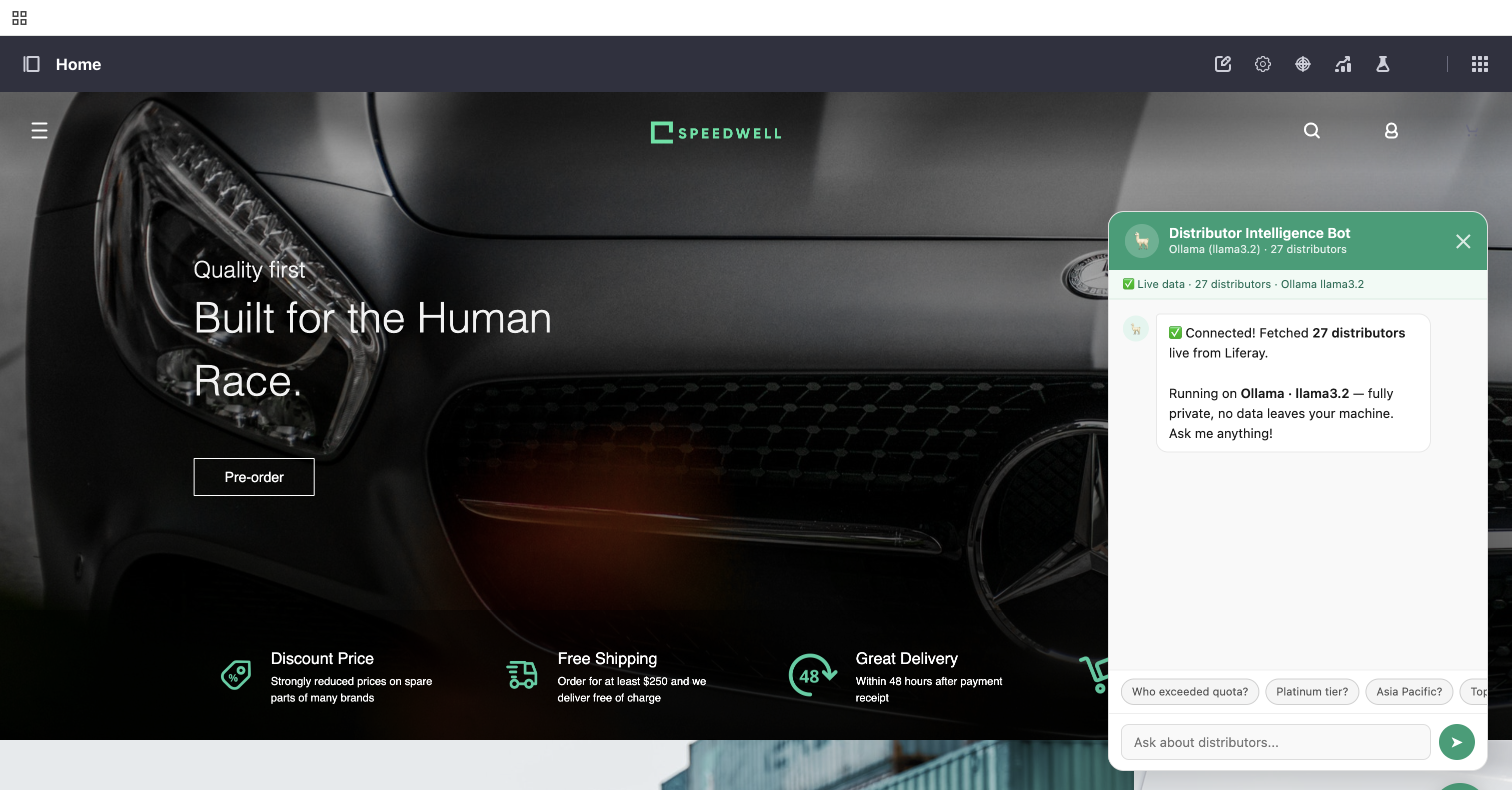
I thought: what if there was a Distributor Intelligence sitting on our portal homepage something you could ask anything, and it would answer using real, live distributor data?
Simple idea. Not-so-simple journey. Here's exactly what I did, what broke, and what finally worked.
The Idea: RAG + LLM on Top of Liferay DXP
The concept was straightforward:
- Store distributor data as a proper structured object in Liferay not a spreadsheet, not a PDF, but a real database object with fields like name, location, region, quota, last year sales, tier, number of employees, and so on.
- Build a Distributor Intelligence that fetches that live data every time someone asks a question.
- Send the data as context to an LLM, which then answers in plain English.
This pattern is called RAG(Retrieval Augmented Generation). Instead of training a model on your data (which is expensive and slow), you just retrieve the relevant data at query time and hand it to the model as context. The model reads it and answers. Simple, fresh, always up to date.
The key word I kept in mind: live. Not hardcoded. If someone adds a new distributor today, the Distributor Intelligence should know about it tomorrow without anyone touching the code.
Step 1: Creating the Distributor Object in Liferay
The first real step was setting up the data structure properly. I created a custom Object Definition in Liferay called Distributor with 14 fields:
- Distributor Name — the primary identifier
- Location and Region — where they operate
- Annual Quota — what they're expected to sell
- Last Year Sales and Current Year Sales — how they actually performed
- Distributor Tier — Bronze, Silver, Gold, or Platinum
- Established Year — how long they've been around
- Number of Employees — size of the operation
- Active Status — are they currently active?
- Product Categories — what they distribute
- Contact Email and Contact Phone
- Notes — any special context about the distributor
Once the object was published, I loaded 30 distributor entries real-looking dummy data spanning North America, Europe, Asia Pacific, Middle East, Latin America, and Africa. Different tiers, different sizes, different performance levels. Enough variety to make the Distributor Intelligence genuinely useful for testing.
Step 2: Building the Distributor Intelligence Widget
I built the Distributor Intelligence as a Liferay HTML fragment a floating chat button fixed to the bottom-right corner of the homepage. Click it, and a chat panel slides open. Type a question, get an answer.
The first version had the distributor data hardcoded inside the JavaScript. It worked, but it defeated the whole purpose. If someone added a new distributor, the Distributor Intelligence wouldn't know. That's not RAG, that's just a fancy FAQ.
So I rewrote the fetch logic to call the Liferay API at runtime:
/o/c/distributors?page=1&pageSize=100Every time a user asks a question, the Distributor Intelligence:
- Fetches the latest distributor records from Liferay
- Converts them into readable context
- Sends them to the LLM along with the question
- Displays the answer
New distributor added to Liferay? The next question the Distributor Intelligence receives will automatically include it. No code changes. No redeployment. That's the RAG magic.
Step 3: Switching to Ollama (Local LLM)
This is where I had to stop and think seriously, not just about the technical problem, but about what kind of data I was actually handling.
Our distributor network is not public information. It includes:
- Sales figures — who is performing, who isn't, and by how much
- Annual quotas — internal commercial targets we set with each partner
- Tier classifications — which distributors we consider Gold or Platinum and why
- Contact details — personal emails and phone numbers of business partners
- Notes — internal commentary that could be commercially or relationally sensitive
Sending all of that to a cloud LLM API even a reputable one means that data is leaving your infrastructure, travelling over the internet, and being processed on someone else's servers. Depending on your region, your contracts with distributors, or your internal data governance policies, that could be a real problem. At minimum, it is a conversation you would need to have with your legal and compliance teams before going live.
The answer was straightforward: don't send the data anywhere. Run the model locally.
Ollama is a tool that lets you run open-source LLMs entirely on your own machine — no API key, no cloud account, no data leaving your network. You install it, pull a model, and it runs a local API server on localhost:11434. That's it.
# Allow requests from Liferay running on port 8080
OLLAMA_ORIGINS=* ollama serve

# Pull a capable open-source model
ollama pull llama3.2
Same RAG concept, completely different trust boundary. The distributor data flows from Liferay → browser → Ollama, and every single hop of that journey stays within localhost. Nothing touches the public internet.
Why this matters for a distributor network specifically:
When you ask "which distributors missed their quota last year?", the answer reveals underperforming partners by name. When you ask "who are our Platinum tier distributors?", you are exposing your most strategically important relationships. This is exactly the kind of information that should never be processed by an external API without explicit consent and legal review.
With a local LLM, that concern disappears entirely. The model runs on your hardware, the data stays in your network, and there is no third party involved at any point in the conversation.
What the Distributor Intelligence Can Do Now
Once everything was wired up, the Distributor Intelligence handles questions like:
- "Who exceeded their quota last year?" — ranks distributors by quota achievement
- "List all Platinum tier distributors" — filters by tier
- "Which distributors are in Asia Pacific?" — filters by region
- "Who is our top performer by sales?" — sorts by last year sales
- "Which distributors are inactive?" — filters by active status
- "Compare quota vs actual sales for all distributors" — computes and presents the full comparison
And because it re-fetches from Liferay on every question, any new distributor added to the system is immediately available to the Distributor Intelligence. No cache to clear. No code to update.

The Stack, In Summary
| Layer | What I Used |
|---|---|
| Data Store | Liferay Object (custom Distributor definition) |
| API | Liferay Headless REST (/o/c/distributors) |
| LLM | Ollama running locally (llama3.2) |
| RAG | Live fetch on every query, plain text context injection |
| UI | Liferay HTML Fragment (floating chat widget) |
| Auth | Liferay.authToken passed as p_auth + X-CSRF-Token |
Related Assets...
More Blog Entries...