Blogs
Understanding Back-Channel Logout in Liferay DXP 2026.Q1 and what it means for your authentication architecture.

David H Nebinger
If you've searched for information about OpenID Connect (OIDC) Single Logout (SLO) in Liferay, you've probably come across answers stating that it isn't supported. That answer was accurate for a long time, and it still occasionally appears in support discussions today.
Beginning with Liferay DXP 2026.Q1, however, that answer is no longer correct.
Liferay now supports the OpenID Connect Back-Channel Logout specification, allowing an OpenID Provider (OP) to notify Liferay that a user's central authentication session has ended so the corresponding portal session can be terminated as well.
This isn't every logout mechanism defined by the OpenID Connect specifications, and that's an important distinction. In this post we'll look at what is supported today, how it works, how to configure it, and what it means for production deployments.
Understanding the Terminology
If you're familiar with SAML, the terminology can be a little confusing because OpenID Connect uses different names for similar concepts.
| SAML | OpenID Connect |
|---|---|
| Identity Provider (IdP) | OpenID Provider (OP) |
| Service Provider (SP) | Relying Party (RP) |
Liferay's OpenID Connect implementation only acts as a Relying Party (RP).
In other words, Liferay delegates authentication to an external OpenID Provider such as Keycloak, Microsoft Entra ID, Okta, or another standards-compliant identity provider. Liferay does not become an OpenID Provider itself.
That distinction explains why only certain OpenID Connect specifications apply to Liferay.
There Isn't Just One "OIDC Logout"
One of the biggest sources of confusion is that people talk about "OIDC Single Logout" as though it were a single feature.
It isn't.
OpenID Connect defines multiple specifications for ending authenticated sessions, each designed for different scenarios.
Some involve browser redirects. Others use hidden iframes. Others avoid the browser entirely and rely on secure server-to-server communication.
As of Liferay DXP 2026.Q1, Liferay implements the Back-Channel Logout specification.
Support for RP-Initiated Logout, where Liferay requests that the OpenID Provider terminate the user's single sign-on session, is planned for a future release. As always, roadmap items are subject to change.
Understanding which logout specification is being discussed is important because saying "OIDC logout is supported" or "OIDC logout isn't supported" doesn't tell the whole story.
Why Back-Channel Logout Exists
Consider a fairly typical enterprise deployment.
A user authenticates through Keycloak (or any OIDC OP) and gains access to several applications.

The user now has active authenticated sessions in each application.
Later, an administrator disables the account or terminates the user's identity provider session.
Without Single Logout, the user has technically been logged out of the identity provider, but every application still has its own active session.
The user may continue working in Liferay until the portal session expires naturally.
The same may be true for Grafana, Jenkins, or any other relying party.
That's clearly not ideal.
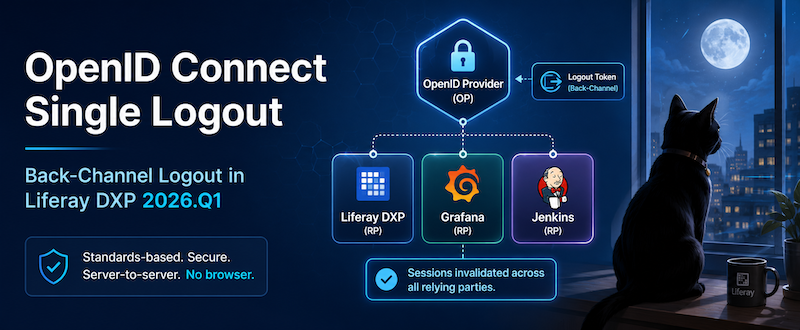
Back-Channel Logout solves this problem by allowing the OpenID Provider to notify every participating application that the central authentication session has ended.
Each application can then invalidate its own local session immediately.
How Back-Channel Logout Works
Unlike browser-based logout mechanisms, Back-Channel Logout is entirely server-to-server.
The user's browser isn't involved.
There are no redirects.
There are no hidden iframes.
Instead, the OpenID Provider sends a signed Logout Token directly to each registered relying party.
The overall flow looks like this.

From the user's perspective, nothing happens in the browser until they attempt another request.
The next interaction with Liferay discovers that the authenticated session no longer exists, and the user must authenticate again.
Liferay's Implementation
Liferay's implementation follows the OpenID Foundation's Back-Channel Logout specification.
Rather than implementing provider-specific integrations, Liferay focuses on standards compliance, allowing it to interoperate with any OpenID Provider that implements the same specification.
Once OpenID Connect is configured, Liferay exposes the following endpoint:
/o/open_id_connect/backchannel_logoutWhen the OpenID Provider determines that a user's authenticated session has ended, it sends a signed Logout Token to this endpoint.
Liferay validates the token.
If validation succeeds, Liferay identifies the corresponding authenticated portal session and invalidates it.
That's the entire logout flow from Liferay's perspective.
Configuring Back-Channel Logout
The good news is that there isn't much additional configuration required inside Liferay.
If OpenID Connect is already configured, enabling Back-Channel Logout primarily involves registering Liferay's logout endpoint with your OpenID Provider.
The process typically looks like this:
- Configure OpenID Connect normally in Liferay.
- Configure your OpenID Provider as you normally would.
- Register Liferay's Back-Channel Logout endpoint:
https://your-liferay-host/o/open_id_connect/backchannel_logout- Enable Back-Channel Logout support in your identity provider, if required.
The exact steps for registering the endpoint vary by provider, but the concept remains the same regardless of whether you're using Keycloak, Microsoft Entra ID, Okta, or another standards-compliant implementation.
Security Considerations
At first glance, exposing a logout endpoint may seem concerning.
What prevents someone from sending arbitrary HTTP POST requests and logging users out?
The answer is the Logout Token.
The OpenID Provider sends a cryptographically signed Logout Token that identifies the authenticated session being terminated.
Liferay validates that token before taking any action.
If validation fails, the logout request is rejected.
In other words, the endpoint isn't a public "log out any user" API.
It only accepts properly signed logout notifications from the configured OpenID Provider.
Operational Considerations
Although the implementation itself is straightforward, there are a few operational details worth remembering.
The OpenID Provider Must Reach Liferay
Back-Channel Logout is initiated by the OpenID Provider, not the user's browser.
That means your identity provider must be able to reach Liferay's Back-Channel Logout endpoint.
In practice, this means paying attention to reverse proxy configuration, firewall rules, DNS resolution, TLS certificates, and public endpoint accessibility.
If the OpenID Provider cannot successfully deliver the Logout Token, Liferay has no way of knowing that the central authentication session has ended.
Browser Behavior
Because this is a server-to-server protocol, users won't necessarily notice anything immediately.
If they're actively viewing a page inside Liferay, nothing visibly changes.
The logout is detected the next time the browser communicates with the portal.
This behavior is expected and is one of the defining characteristics of the Back-Channel Logout specification.
Clustered Liferay Environments
Back-Channel Logout does not introduce a special clustering requirement.
If a Liferay environment is using OpenID Connect Single Sign-On, each node already participates in the same authentication model. Once the OpenID Provider ends the session and Liferay processes the Logout Token, subsequent attempts to use that authenticated session should fail regardless of which cluster node receives the request.
The important operational concern is therefore not session replication between Liferay nodes. It is ensuring that the OpenID Provider can reach Liferay's Back-Channel Logout endpoint and that the Logout Token can be validated successfully.
What Isn't Supported Yet?
Another OpenID Connect specification is RP-Initiated Logout.
Instead of the identity provider initiating logout, the relying party starts the process.
For example, imagine a user clicking Log Out inside Liferay.
Rather than only invalidating the local portal session, Liferay could also request that the OpenID Provider terminate the user's central single sign-on session.
That, in turn, would allow the identity provider to notify every participating application.
The flow would look something like this.

Support for RP-Initiated Logout is planned for a future Liferay release, although, as with any roadmap item, plans may change.
When both specifications are available, they complement one another rather than replace one another.
Back-Channel Logout allows the OpenID Provider to terminate application sessions.
RP-Initiated Logout allows an application to terminate the user's central identity provider session.
Together they provide a more complete single logout experience.
Final Thoughts
The important takeaway is that saying "Liferay doesn't support OIDC Single Logout" is no longer accurate.
Beginning with Liferay DXP 2026.Q1, Liferay supports the OpenID Connect Back-Channel Logout specification, allowing standards-compliant OpenID Providers to securely terminate authenticated portal sessions without relying on browser redirects or provider-specific integrations.
If your organization already uses OpenID Connect for Single Sign-On, enabling Back-Channel Logout helps ensure that when the user's central authentication session ends, their Liferay session ends as well. That's an important improvement for both security and operational consistency across multiple applications.
Support for RP-Initiated Logout would make the logout story even more complete, but the existing Back-Channel Logout implementation already addresses one of the most important challenges in federated authentication: keeping application sessions synchronized with the identity provider.
As more organizations adopt centralized identity platforms, standards-based logout becomes just as important as standards-based login. It's good to see Liferay continuing to build on the OpenID Connect specifications in a way that improves interoperability while remaining provider agnostic.
For more information, check out Liferay's documentation for OIDC.
Related Assets...
More Blog Entries...