Blogs

Meera Prince
5 perces olvasmány
The Open Services Gateway Initiative (OSGi) is specification that defines modular based software management and its execution. OSGi makes software management and its execution simpler by making large application into small bunch of pieces and we call it as module. These modules are working independent way so that when we need we can start module and we can stop module. As for OSGi a module is
Bundle or Plugin-in
OSGi provides execution environment so that we
can install, start and stop module whenever we required such a way OSGi provides OSGi containers to manage lifecycle of these bundles.
Bundle/Plug-In/Software component
Bundle is a collection Java classes and resources make it as package then we call it as bundle and these bundle can be working as independent or it can be depends on other bundle or plugin. We can say bundle is small piece of software and as for OSGi we can specify as
OSGi bundle.
Note:
As for our understand bundle is
java jar file.
OSGi specification
OSGi implementations
After release of OSGi specification by
OSGi Alliance in March 1999 then people implemented specifications as software and the following are popular implementation software open source groups.
Equinox
Equinox is reference implementation of OSGi from
eclipse and they have implanted OSGi software so that it provides runtime environment for OSGi based software development.
Apache Felix
Felix is also implemented OSGi specification from Apache and its open source implementation.
Knopflerfish
Knopflerfish is another Open source Implementation for OSGi
Note:
All above implementation covered all specifications of
OSGi R3 and OSGi R4 specifications.
Software Developers can use any one of the implementation to implement their software as modular based way. We can also inherited features from above all implementations.
All OSGi implementations they packages as jar file so that it will provide execution environment for OSGi bundles. OSGi have basic standalone container to execute bundles and if we want other environments support we need to take relevant environment support bundle so that it will provide execution environment for different kind of environment.
Basic OSGi implementation Jars
From Apache Felix
|
felix.jar
|
Start the framework
From the installation directory by typing in the terminal
|
java -jar bin/felix.jar
|
From Eclipse Equinox
|
org.eclipse.osgi_3.2.0.jar
|
Start OSGi Framework
|
java -jar org.eclipse.osgi_3.2.0.jar –console
|
The above implementation jars covered all specification that defined by OSGi so that we can develop OSGi bundles then we can run it on OSGi containers.
OSGi bundle Lifecycle
As for software development mode each software component have its own lifecycle same way OSGi bundle also have its own lifecycle and these lifecycle will be manged by OSGi Framework implementation software or we can say OSGi containers.
The following are OSGi bundle lifecycle stages
|
Install
Resolved
Uninstall
Start
Active
Stop
|
Install
Install is start point to OSGi bundle and we need to install OSGi bundle with help OSGi commands then Bundle will be available in OSGi container.
Resolve
In the resolve stage it will check all dependent bundles and its required bundles if everything satisfied then it will moved to other stage otherwise it will be uninstalled.
Uninstall
Uninstall is completely removing OSGi bundle from OSGi container and this we can manually uninstall with command or If the bundle not resolved by all decencies then it’s automatically uninstalled.
Start
After all dependencies and required bundles are resolved then bundle will be started, once bundle is started then it will be available for use.
Active
Once bundle available to use in OSGi container then we will make it active so that it will be under real usage and it we can experience as end user.
Stop
Stop stage we can make OSGi bundle inactive so that it will not available for real use but still Bundle available for OSGi container.
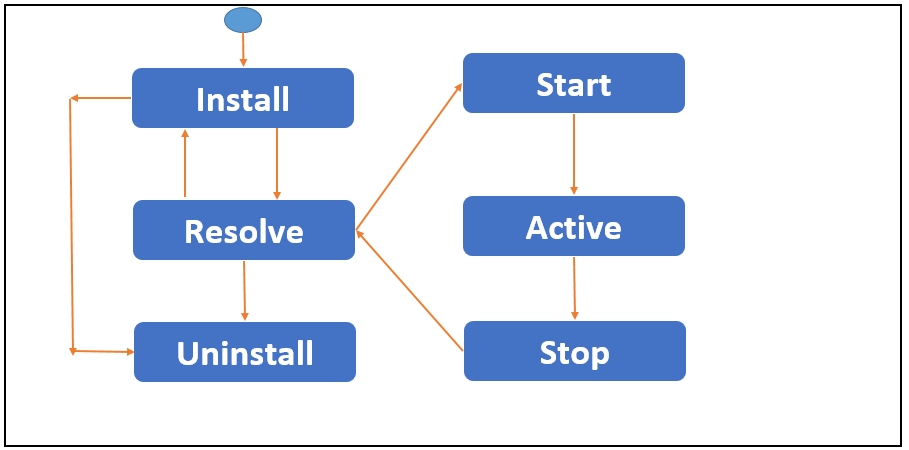
The following are the commands to working with OSGi Bundle lifecycle
Apache Felix
The following are the commands to working with bundle lifecycle and we need to provide bundle path as variable for each command.
|
felix:install file:/path/to/bundle/bundle.jar
felix:start file:/path/to/bundle/bundle.jar
felix:stop file:/path/to/bundle/bundle.jar
felix:update file:/path/to/bundle/bundle.jar
felix:uninstall file:/path/to/bundle/bundle.jar
|
To work with shell based commands Apache Felix uses another OSGi bundle called
Apache Felix GOGO
Apache Felix GOGO
Apache Felix GOGO is sub project of Apache Felix and it provide command based interface to working with OSGi bundles lifecycle.
The Gogo subproject of Apache Felix and its consists of three bundles
Runtime
Implements the core command processing functionality.
The following is Bundle implemented Runtime
org.apache.felix.gogo.runtime.jar
Shell
Provides a simple textual user interface to interact with the command processor.
The following is Bundle implemented Shell
org.apache.felix.gogo.shell.jar
Command
Implements a set of basic commands.
org.apache.felix.gogo.command.jar
Note:
Apache Felix GoGo is already included in the Apache Felix Framework Software so as soon as we start Felix OSGi jar file then it will be available as console so that we can use above specified commands to manage bundle lifecycle.
Example Gogo Console
Open your terminal in you system start Felix Framework jar file then you can see Apache Felix GoGo console.
|
$ cd felix-framework-3.0.0
$ java -jar bin/felix.jar
_______________
Welcome to Apache Felix Gogo
g! lb START LEVEL 1 ID|State |Level|Name 0|Active | 0|System Bundle (3.0.0) 1|Active | 1|Apache Felix Bundle Repository (1.6.2) 2|Active | 1|Apache Felix Gogo Command (0.6.0) 3|Active | 1|Apache Felix Gogo Runtime (0.6.0) 4|Active | 1|Apache Felix Gogo Shell (0.6.0) 5|Installed | 1|Example Bundle (1.0.0) g! start 5 Hello from Bundle 5. g! |
lb command list the available bundle in OSGi container and to start the bundle we can specify the
bundle order number as argument.
Equinox
Similar to Apache Felix equinox also have similar commands and its console to work with bundle lifecycle
|
install <bundle URL>
Installs the bundle from the given URL
start <bundle # or bundle name>
Starts the bundle with the given numeric or symbolic id
stop <bundle # or bundle name>
Stops the bundle with the given numeric or symbolic id
ss
Reports a summary status of all installed bundles
diag <bundle # or bundle name>
Reports any resolution problems for the bundle with the given numeric or symbolic id
|
Equinox also implemented OSGi console using following bundle
|
org.eclipse.equinox.console.jar
|
Internally Equinox also used
Apache Felix gogo to provide command line interface and along with Equinox console.
Example of Equinox Console
|
osgi> ss
"Framework is launched."
id State Bundle
0 ACTIVE org.eclipse.osgi_3.10.0.v20140606-1445
1 ACTIVE org.apache.felix.gogo.runtime_0.10.0.v201209301036
2 ACTIVE org.apache.felix.gogo.command_0.10.0.v201209301215
3 ACTIVE com.meera.sample.HelloWorld_1.0.0.qualifier
4 ACTIVE org.apache.felix.gogo.shell_0.10.0.v201212101605
5 ACTIVE org.eclipse.equinox.console_1.1.0.v20140131-1639
osgi> stop 3
Goodbye World!!
osgi> start 3
Hello World!!
Osgi
|
SS will use to list available bundles in OSGi container and we will use Bundle number in to start or stop bundle.
To work with Basic OSGi development using Apache Felix we need following bundles
|
felix.jar
org.apache.felix.gogo.runtime.jar
org.apache.felix.gogo.command.jar
org.apache.felix.gogo.shell.jar
|
To work with Basic OSGi development using Equinox we need following bundles
|
org.eclipse.osgi_3.10.0.jar
org.apache.felix.gogo.runtime.jar
org.apache.felix.gogo.command.jar
org.apache.felix.gogo.shell.jar
org.eclipse.equinox.console.jar
|
If we want work with other environments such as web applications we should have other OSGi bundle to provide execution run time environment.
Example:
To work with web application environment using OSGi we need following OSGi implementation bundles
|
Apache Felix HTTP Service
Apache Felix Web Console
Apache Felix Log
|
Similarly we need different implementation OSGi bundle to provide different types of environments.
In this case we need to setting up required bundles so that we can create execution environment rather than this there is project from Apache called
Apache Arise it will provide all types of pluggable OSGi plugins to create different types of execution environment
Apache Aries
The Aries project consists of a set of pluggable Java components enabling an enterprise OSGi application programming model. This includes implementations (and extensions) of the following Enterprise OSGi specifications
|
Asynchronous Services and Promises Specification
Blueprint Specification
JTA Transaction Services Specification
JMX Management Model Specification
JNDI Services Specification
JPA Service Specification
Service Loader Mediator Specification
Subsystem Service Specification
|

Related Assets...
Nincsenek találatok
More Blog Entries...

Community
Company
Feedback