
Blogs

Meera Prince
9 Minute Read
Objective:
Configure SSL (Secure Socket Layer) for Liferay portal.
What is SSL?
SSL is secured socket layer which secure our application data in the network means it will protect application data while are exchanging data from web browsers to web servers.SSL is mechanism to protect application data when it travel in the network.SSL use the https protocol in the network
We have two protocols
|
HTTP, HTTPS
HTTP is simple protocol we use in web applications to communicate client and server.
HTTPS is same like http but this protocol will work in the secure socket layer so that application data can be protected while data travel in the network.
When we send any request using https protocol it need SSL help to protect data.
|
How SSL is working?
SSL use the https protocol to communicate client with server with secured layer and to make it work we need SSL certificates
.
What is SSL certificate?
SSL certificate is like information which contain the public key, private key and data Encryption algorithm information.
This information will used by server to encrypt data and decrypt data when the client and server communication is occurred. Similarly Clint also uses same information to encrypt and decrypt the request and response data.
This public and private key information shared by Client and Server when Server and Clint are in the communication.
SSL Working Mechanism
- We already know SSL uses the Https protocol in the client server communication.
- When it is https protocol communication then application data will travel in secure layer in the network.
- When client send the request to server before request travel in network then request data will be encrypted by using SSL certificate information. This certificate provides the encryption algorithm and public key and private to encrypt the data.
- Once data is encrypted then application data will be travel in secure layer because its https request.
- As soon as request reached by server then server will take the request and it will decrypt the data by using same encryption algorithm, public and private key.
- This information will be available in SSL certificate so that server can get this information and able to decrypt. We already know client and server will use same certificate information and the certificate will be shared by the server and client.
- Once request is decrypted then server processes the request and it will prepare the response. Now server is responsible to encrypt response by using SSL certificate information.
- Once the data is encrypted it will send to client and it will use secure layer while travel in the network.
- As soon as response reached by client then it can decrypt the data by using SSL certificate information.
- This process will apply to each and every request and response while in the communication.
Note:
Here we need to communicate server and client using HTTPS protocol then only server and client can understand the communication secure type and https protocol use 443 port by default.
How to get the certificates?
We need get SSL certificates from SSL certificate vendors in the market. We need to purchase certificate and we need to use for our application. In production environment we have to use trusted certificates from reputed vendors. Verisign is one of SSL certificate vendor.
How can I implement SSL in local environment?
We will use self signed certificate in local development environment.
How to create Self-Signed SSL Certificates in Local Development Environment?
We will use Java Key Tool or Open SSL tool to create certificates in Local environment.
Java Key Tool by default will come with JDK so that we need install JAVA in our machine to create Self-Signed Certificates.
How to Configure SSL in Server?
We need to add SSL certificate to server JRE so that server can use these certificates. After add the certificate to server JRE we need to configure certificate information in server configuration files and we need to enable https protocol to server.
Note:
SSL configuration is varying from server to server based on server vendor. And server will always look for certificate information JRE/lib/securityfolder this is default location for certificates. Server will search certificates information from cacerts file this file available in jre\lib\security of any JDK.
SSL configuration for Liferay Portal
The following are the steps to configure SSL in Liferay Portal.
- Create SSL certificate using Java Key Tool
- Configure SSL in Liferay Portal Server
Create SSL certificate using Java Key Tool
The following are the steps to create certificate using Java Key Tool
- Generate Key
- Export Key Information into Certificate
- Import certificate into Server JRE
Java Key Tool is default tool which comes with JAVA. Before use these we need to install java. Once install java then we can use Java Key Tool. WE use Java Key Tool from Command Prompt to create certificate.
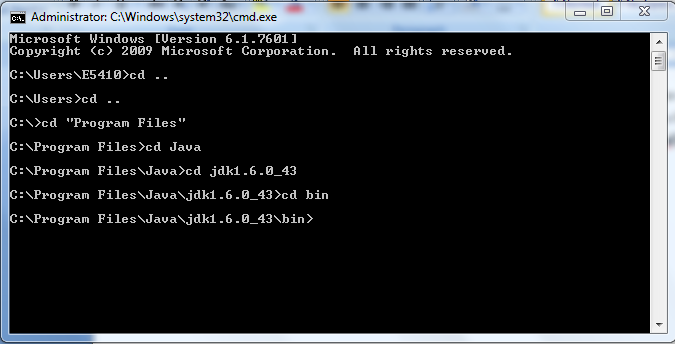
Open command prompt and go to java installation bin path because there java key tool available.
The following screen shows the example java bin path
Note:
If you set java path in your system then you can access java key tool from any directory. Otherwise we need to point to java bin path from command prompt.
Generate Key
For generating key we need use following command and we need to pass some input values
The following are input options:
|
-alias: this is just reference name to key
- keyalg: which specify the encryption algorithm and the algorithm will use when data will encrypt like RSA.
-keypass: password for key and default we will use changeit
|
Enter following command in command prompt
|
keytool -genkey -alias tomcatserver -keypass changeit -keyalg RSA
|
Once enter this command it will ask some information please provide accordingly and please make sure first name and last name should be name of your host (localhost) or domain name. We should not provide IP Address.
The following is information will ask by tool once we enter above command
|
Enter keystore password: changeit
What is your first and last name?
[Unknown]: localhost
What is the name of your organizational unit?
[Unknown]: ASW
What is the name of your organization?
[Unknown]: ASW
What is the name of your City or Locality?
[Unknown]: HK
What is the name of your State or Province?
[Unknown]: HK
What is the two-letter country code for this unit?
[Unknown]: HK
Is CN=localhost, OU=ASW, O=ASW, L=HK, ST=HK, C=HK correct?
[no]: yes
|
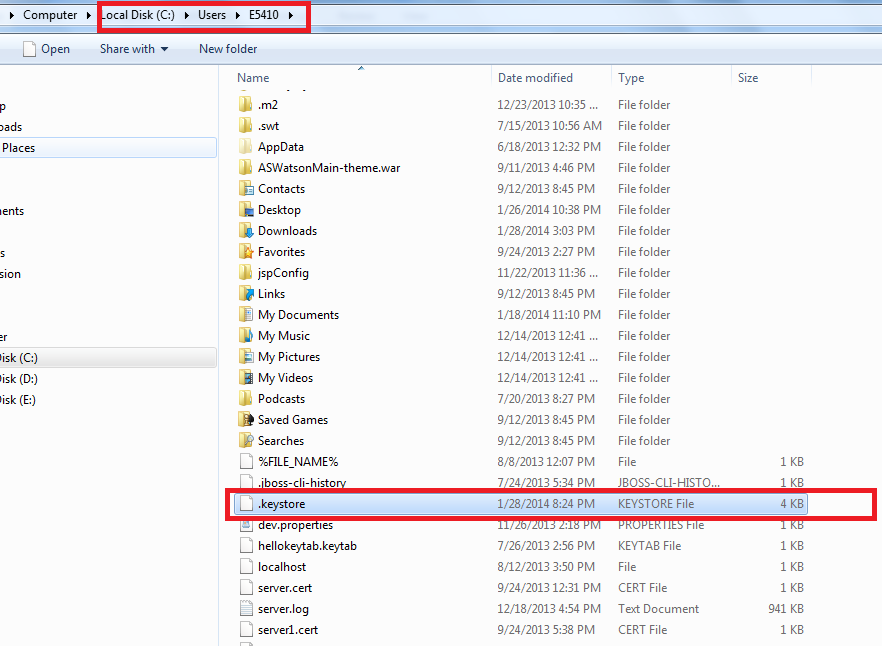
Now key was generated and it was Stored in the default key store file that is called .keystore file
The default keystore (.keystore) file available in C :\Users\<username>directory of your computer
The following is example to .keystore in my computer
Note:
If we want store generated key in our own keystore file then use following command
|
keytool -genkey -keystore c:\users\localhost.keystore -alias tomcatmeera -keyalg RSA
Provide –keystore value this is path to our keystore file
|
Export Key Information into Certificate
We already generated key and that key information stored in .keystore file. Now we need export this key into some certificate and name of certificate is our choice and the extension should be .cert
Example for name of certificate myserver.cert
Enter following command that will export key into given certificate file
|
keytool -export -alias tomcatserver -keypass changeit -file myserver.cert
|
Note:
The above command will search the key information in .keystore file in default location i.e. C:\Users\<username>
We need to give exact alias name that is we previously used when we generate key in previous step
If the key stored in our own keystore file then we need to provide keystorefile path with following command
|
keytool -export -alias tomcatmeera -keypass changeit -file
myserver.cert –keystore c:/users/localhost.keystore
|
Import certificate into Server JRE
Now we need to import certificate into server JRE Because Server will always search certificate information in JRE which used by server.
Generally all certificates available in jdk1.6.0_43\jre\lib\security location and server will always search the certificates from this location.
We will import all certificates in cacerts file this default file to server. Now we need to import our created certificate into cacerts (jdk1.6.0_43\jre\lib\security\cacerts)
Use following command to import certificate into cacerts
|
keytool -import -alias tomcatserver -file
"C:\Users\E5410\myserver.cert" -keypass changeit -keystore "C:\Program Files\Jav
a\jdk1.6.0_43\jre\lib\security\cacerts"
|
As soon as you enter above command it will ask password and enter password then it will show certificate information then you need enter yesthen certificate will be imported into JRE default certificate file location ( jre\lib\security\cacerts).
The following is information after enter above command
|
Enter keystore password:changeit
Owner: CN=meera, OU=meera, O=meera, L=meera, ST=meera, C=meera
Issuer: CN=meera, OU=meera, O=meera, L=meera, ST=meera, C=meera
Serial number: 52e7aad6
Valid from: Tue Jan 28 21:04:22 CST 2014 until: Mon Apr 28 21:04:22 CST 2014
Certificate fingerprints:
MD5: 02:FC:FA:21:68:D1:26:57:07:3B:DB:B0:A2:1C:9A:5E
SHA1: D8:52:61:D6:A3:33:97:1E:F9:2F:8C:56:38:26:0D:6C:59:CC:5E:AC
Signature algorithm name: SHA1withRSA
Version: 3
Trust this certificate? [no]: yes
Certificate was added to keystore
|
Note:
We need to give full qualified path information of JRE default certificate location and our created certificate path and paths are enclosed in quote so that we never see any errors.
Alias name we used in all steps because it is reference name to identify the certificate.
The following is complete screen to create Self Signed Certificate and which use the Default Keystore file ( C:\Users\<username\.keystore)

Note:
Key pass every where changeit
Please concentrate on red colored rectangle areas in above screen.
The following is complete screen to create Self Signed Certificate and which use the Our Own Keystore file

Note:
Key pass everywhere is changeit
Please concentrate on red colored rectangle areas in above screen.
Configure SSL in Liferay Portal Server
Now we ready with certificate and we need to configure SSL in server. We already know SSL configuration will change server to server.
Now we need to configure SSL to Liferay Portal Server. We are very familiar with following Liferay Portal Servers
- Liferay Portal Tomcat Server
- Liferay Portal JBoss Server
Liferay Portal Tomcat Server
To configure SSL in tomcat server we will use server.xml file and we wil add connector tag with some SSL related attributes.
Go to Liferay Portal Tomcat Server configuration directory and open server.xml file in any editor.
The following is server.xml location in server
|
tomcat-7.0.40/conf/ server.xml
|
Add following connector xml tag in server.xml
The following configuration will always look for certificate information from JRE default certificate location or .keystore in default system user location
|
<!-- Define a SSL HTTP/1.1 Connector on port 8443 -->
<Connector port="8443" protocol="HTTP/1.1" SSLEnabled="true"
maxThreads="200" scheme="https" secure="true"
clientAuth="false" sslProtocol="TLS" />
|
The following configuration explicitly specify the keystore file location
|
<Connector protocol="HTTP/1.1"
port="7443" maxThreads="200"
scheme="https" secure="true" SSLEnabled="true"
keystoreFile="C:/Users/localhost.keystore" keystorePass="changeit"
clientAuth="false" sslProtocol="TLS"/>
|
Note:
keystorePass this is password we provided at the time of certificate creation .
Connector tag has more additional attributes which will give some addition support and in the configuration we just use some basic required attributes to connector.
SSL configuration Connector tag already defined in server.xml file but it’s in comment mode. We just uncomment that SSL configured connector tag and modify accordingly instead of adding new connector tag.
Generally in development environment we will configure server to eclipse. When we configure server to eclipse it will create separate sever instance and server instance have its own configuration files.
Whenever we did SSL configuration in the original server.xml (tomcat7.0.40/conf/server.xml) file. These configurations not update in the existed eclipse local server configuration files.
So we should remove old server in eclipse again add new local server to eclipse so that new server instance have SSL configuration.
The following is screen shows local server in eclipse

Go through following link to get more information about SSL configuration
Liferay Portal Jboss Server
In Jboss also we will use server configuration file to configure SSL. Jboss will use standalone.xml file to configure SSL.
The following is location of standalone.xml file
|
jboss-7.1.1\standalone\configuration\ standalone.xml
|
Now open standalone.xml file and look for following tag this is for http connector tag
.
|
<connector name="http" protocol="HTTP/1.1" scheme="http" socket-binding="http"/>
|
Add following SSL configuration below the above tag as follows and this is for https connector tag.
|
<connector name=" http" protocol="HTTP/1.1" scheme="http" socket-binding="http"/>
<connector name="https" protocol="HTTP/1.1" scheme="https" socket-binding="https" secure="true">
<ssl/>
</connector>
|
When configure above configuration then server enables with https protocol and it will use SSL.
<Connector/> tag has many additional attributes so that it will give more support to SSL. We just use basic configuration.
Same like tomcat server Jboss also look for certificates information in JRE default certificate location i.e. jre\lib\security\cacerts
The following is more information about SSL configuration Jboss server
Note:
Very important thing is we need to add certificates to server using JRE.
Same like tomcat when we use jboss in eclipse please update eclipse server once we completed SSL configuration in original server configuration files i.e. standalone.xml ( jboss-7.1.1\standalone\configuration\ standalone.xml)
When we update server in eclipse then it will get SSL support for eclipse server instance
Access Application in Secure Layer
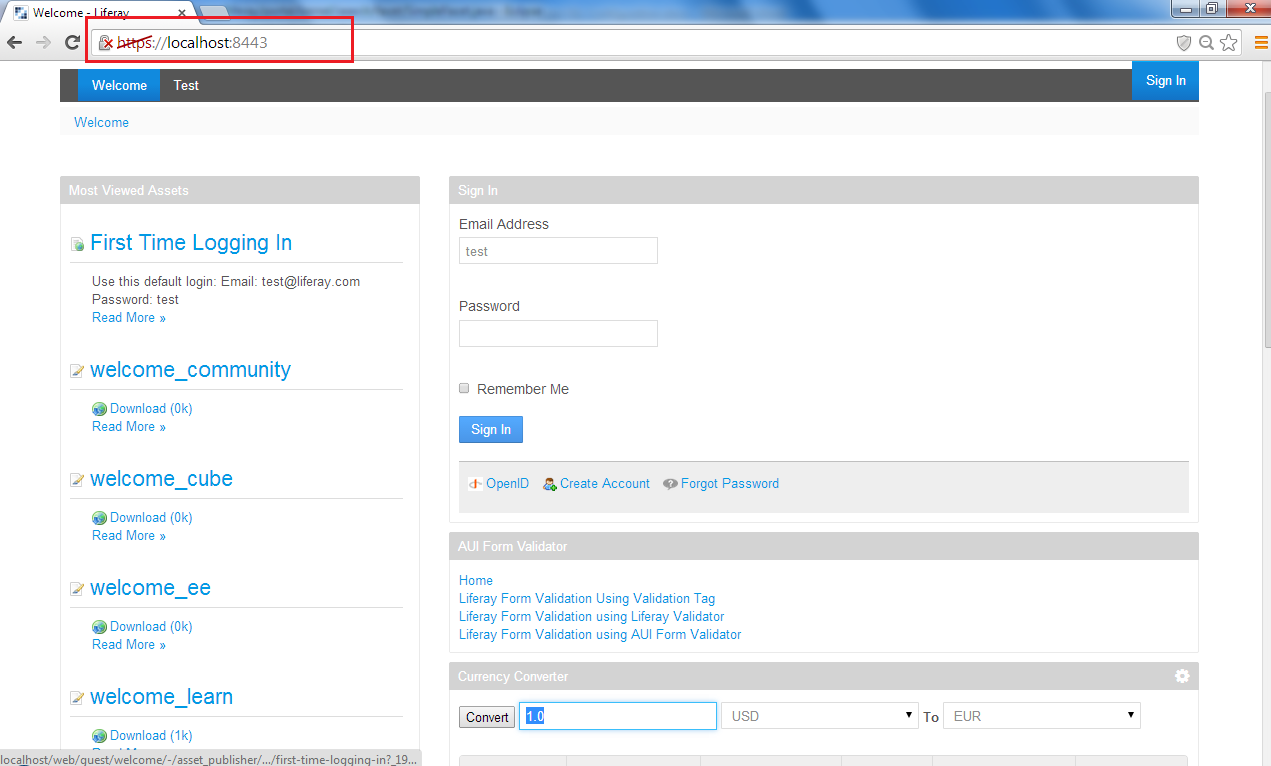
To access application in secured network we need to use https and application will use default 443 port when it uses the https protocol.
The following is URL to access Liferay Portal Application with https in secured way.
Note:
When we use self signed certificates to access our application in browsers then browser will prompt some message like certificate in not trusted. Simple accept and follow further steps which showed by browser.
The following is the screen to show Liferay Portal in Chrome when we use Self-signed certificates.
Simple click on Proceed button so that you can view Liferay Portal in browser.

The following is screen to show Accessing Liferay Portal using SSL
Important Pints
- SSL use the https protocol to provide secure layer for application data while in the network.
- We need to add trusted certificates information in server JRE so that data will be encrypted or decrypted when the client server communication is occurred.
- In the real environment or production environment we need to get SSL certificate from SSL vendors.
- In the development environment we will use Self Signed Certificates and which can be created by using Java Key Tool
- We need to add self signed SSL certificates to Server JRE default SSL certificates location i.e jre\lib\security\cacerts
- To configure SSL information in server we will use server configuration files these file name varying from server to server.
- To enable SSL is we need to enable HTTPS connector and there we need pass SSL certificate information as attributes values.
Author
Related Assets...
No Results Found
More Blog Entries...

Tibor Lipusz
December 13, 2025

José María Muñoz
December 12, 2025

Community
Company
Feedback