Blogs

Meera Prince
2 من الدقائق قراءة
Introduction:
Liferay have in built support for REST API so we can create REST web services for Plugin portlets means we can create web services for custom entities or portlet related entities.
Creating web services in Plugin portlet is very easy and we will use service builder help to generate web services.
Generate JSON web service in Plugin Portlet
- Create simple Liferay MVC Portlets using Liferay IDE with eclipse
- Define required entities in service.xml file and use remote service true for entities
- Run service builder
- Define web service java method in XXXServiceImpl and Run service Builder
- Deploy the portlet into server
- Access Plugin Portlet JSON Web Services
Steps to Produce JSON web services in Liferay Plugin Portlet
The Following are the steps write custom methods to produce JSON web services:
Create simple Liferay MVC Portlets using Liferay IDE with eclipse
Create Plugin portlet in Liferay using liferay IDE and portlet is liferay MVC portlet.
Go through following link to setup Liferay Development Environment
Define required entities in service.xml file and use remote service true for entities
Create service.xml file in Portlet
WEB-INF directory or we can also use liferay IDE to create service.xml file this is nothing but create service builder for Plugin portlet
Open service.xml file and define data base tables and put remote-service is true. When we put remote service true then it will create default JSON web services.
|
<?xml version=
"1.0" encoding=
"UTF-8"?>
<!DOCTYPE service-builder PUBLIC "-//Liferay//DTD Service Builder 6.1.0//EN" "http://www.liferay.com/dtd/liferay-service-builder_6_1_0.dtd">
<service-builder package-path=
"com.meera.jsonwebservices.db">
<author>E5410</author>
<namespace>JSON</namespace>
<entity name=
"Employee" local-service=
"true" remote-service=
"true">
<column name=
"emplyeeId" type=
"long" primary=
"true"/>
<column name=
"emplyeeName" type=
"String" />
<column name=
"employeeDesignation" type=
"String" />
<order by=
"asc">
<order-column name=
"emplyeeId" />
</order>
</entity>
</service-builder>
|
Run service builder
Run service builder using
ant build-service or in eclipse you can run this from ant view.
Define web service java method in XXXServiceImpl and Run service Builder
We need to write java method there we will implement according to our requirement.
We need to decide for which entity we have to provide JSON Web Services and find appropriate entity and write required java method
XXXServiceImpl.java and the XXXServiceImpl class is under package
your-base-package.service.impl package of your source.
Here
XXX is entity name which is specified in
service.xml
In our example I have implemented in
EmployeeServiceImpl.java here I am getting employee object by employeeId. This method return employee object. In liferay any object automatically sterilizes and produces as JSON data.
The following is example for code
|
public
class EmployeeServiceImpl
extends EmployeeServiceBaseImpl {
public com.meera.db.model.Employee getEmployee(
long emplyeeId)
throwscom.liferay.portal.kernel.exception.PortalException,
com.liferay.portal.kernel.exception.SystemException {
returnEmployeeLocalServiceUtil.
getEmployee(emplyeeId);
}
}
|
Once we completed writing custom method in
XXXServiceImpl.java
Then we need to run service builder using
ant build-service command or from eclipse ant view you can run same command
Deploy the portlet into server
Now finally deploy the portlet into server by using
ant deploy command or from ant view you can use same command. Now we are ready with Plugin Portlet JSON web services
Note:
For each modification in XXXServiceImpl.java or in service layer we have to run
ant build-service command later we have to deploy the portlet using
ant deploy then only change will be applied to the services.
Access Plugin Portlet JSON Web Services
Create JSON web service is pretty easy we already know. Now we need to access plugin portlet web services.
We can accedes Plugin portlet JOSN Web Services in two ways
UsingPortal Context (
Liferay Plugin Portlet JSON Web Services Part-II
)
UsingPlugin Portlet Context (
Liferay Plugin Portlet JSON Web Services Part-III
)
Note:
Click the above hyper links to continue the tutorial.
Download
LiferayJSONWebservices portlet from following location
You can find source and war file
Note:
Portlet developed in
Liferay 6.2CE version
Procedure for deploy portlet:
You can use war file and directly place in your portal deploy folder and test or you can also use source to deploy portlet.
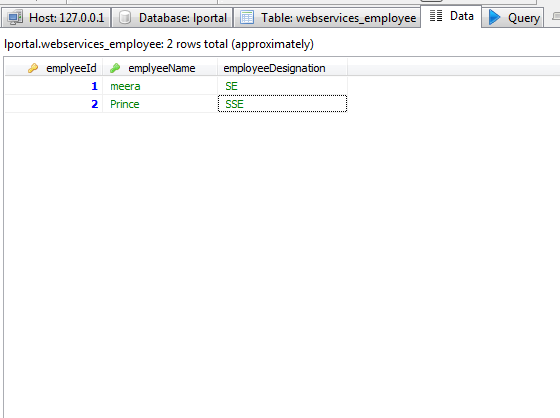
Once portlet is deployed successfully insert data in the following table as shown in screens
webservices_employee
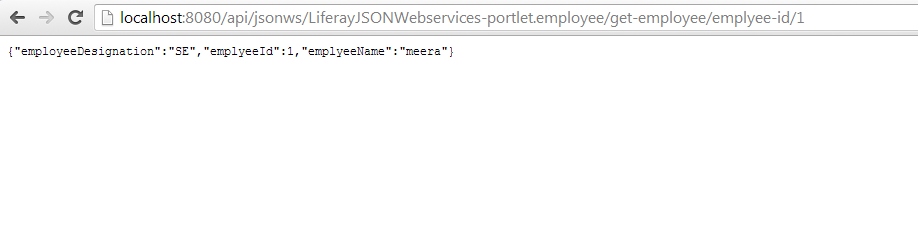
Now test web service URLs
The following is screen show access web service URL in browser
Author
Related Assets...
لا توجد نتائج
More Blog Entries...

Yasuyuki Takeo
أكتوبر ١٠, ٢٠٢٦

Community
Company
Feedback