Blogs

Jorge Ferrer
Ok, maybe the title is a bit pretentious but I have to say that I'm really excited with the results. I'm surprised myself with how much we've been able to do in so little time. IMHO after these improvements Liferay Wiki can be compared to the most known wiki products out there (proprietary or Open Source). Not only it's comparable to them in terms of wiki related functionalities but it also inherits the great features of Liferay Portal such as user managment, permissions, the ability to have several different wikis in one single installation (several per community) and of course the ability to mix and match with all the other Liferay tools such as blogs, forums, content managment, etc.
Let's get to the new features. But first, for those that can't wait here is a screenshot that shows several of the new features:

Nice UI with emphasis in usability
A wiki is a tool used to publish information and often becomes part of public websites, so it has to look good. This includes having a clear visual hierarchy that highlights the title of the page among everything else and makes it easy to read the page text.
One of the nice things of Liferay's wiki is that it lives inside a portal. That is, it doesn't have to care about navigation or look & feel issues. Those features come for granted and the wiki just has to care about it's own content and the portal will give its users great flexibility through all other CMS portlets.
The most important peace of information in a wiki page is its title. In order to make it clearly visible it's bean put the first visible thing in the upper left corner. For those using the wiki in 4.4 note how the tabs that used to be there have been removed. Also the search box have been aligned to the right so that it doesn't interfere with the visual hierarchy. Here is the result comparing what it used to be and what it's now:

(Before)

(After)
If you've noticed an icon in the upper left corner, note that it only appears for administrators and allows them to create several wikis within the same community. They used to be called nodes (and still are called nodes in the code), but the UI have been renamed to match what most people would expect.
When there is more than one wiki in a single community they show as links that allow navigation in a typical way that people would expect:
Also, as the wiki kept increasing in number of functionalities we've had to deal with how to keep it easy to use. In fact, with how to make it easier to use than it was with less functionalities. We wanted to make the "Edit" option clearly visible and not hidden among lots of options. The new "Print" functionality also had to be in every page. All other functionalities were moved to a second screen to keep the the page's screen clean. That second screen is called "Properties" and not only provides useful information about the page but also offers advanced operations to the user. Here is a screenshot of it:
You may have already noticed some new cool functionalities in these images, but be patient I'll get to them.
Print, Preview, Delete and Move
The first new feature added was the ability to cleanly print wiki pages. This has been added as an new icon next to the edit icon and when clicked opens a pop-up which only shows the current page, excluding any other portlet as well as buttons and controls that should not appear in the printed version. Following is a screenshot which shows the original page, the pop-up that appears as a preview of what will be printed and a printer dialog that is automatically open for the user.
Another very useful functionality that was added is the ability to preview changes when editing an article or even before creating it in the first place. To that end a new button has been added next to save and when clicked the current content in the textarea is submitted to the server to generate a preview. The returned page contains the preview in an area with a light yellow background (as shown in the screenshot) to prevent the user from thinking that the page has been saved. Below the preview is a textarea so that the user can continue the edition. Related to this, a new button called "Save and continue" has been added so that editors can save the content from time to time while writing long pages but maintain the edit screen to keep writing.
The delete page functionality is a quite simple operation that wasn't available before. It allows editors to completely delete a page. This option is also available through the Actions menu.
Finally the most advanced functionality added in this group is "Move". This functionality allows changing the title of a page without breaking existing links to that page. To that end, when the page is moved, a "reminder page" is left with the new title that redirects the user to the new one. Note that this redirection is logical, inspired by the way WikiPedia works, which means that the user is informed that he's been redirected so that any potential confusion is prevented. It's also worth noting that when a page is moved all of its history is moved with it and that when a page is deleted any "reminder pages" that it may have left behind after renamings are also deleted.
And here is the result when a link to the old page is used. Note the message under the title:


Call for comments: I called this operation 'move' because it's how MediaWiki calls it. But now I'm thinking of calling it "Rename" which is what it really does, and leave the word 'move' for future operations such as moving across wikis. Thoughts?
Creole syntax support
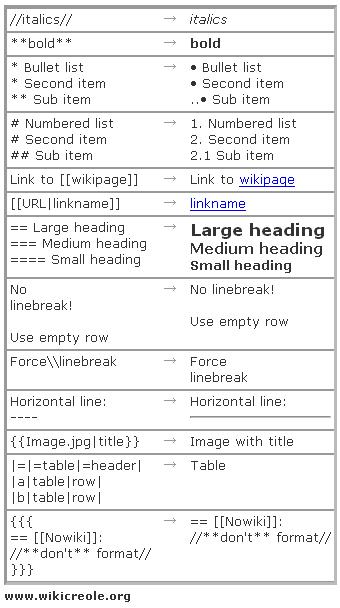
One of the drawbacks of the world of wiki products is that each have an slightly (or completely) different syntax. To solve this problem a group of smart people, including the inventor of the original Wiki, Ward Cunningham, have sat together and designed the Wiki Creole syntax. The goals were to create a syntax that was as similar as possible to the ones already in use, consistent and easy to type and remember. And after implementing it for Liferay and using it for some weeks I have to say that they've done a very good job. For those fans of WikiPedia's syntax, a quote that I read recently is that "Creole is like WikiPedia's syntax but without its inconsistencies".
It's worth noting that the support for Creole in Liferay has been possible thanks to the integration of JSPWiki and specifically using the CreoleFilter developed by the i3G institute. Thanks a lot to all of them.
Here is a cheatsheat of the main syntax elements of creole:
Note for current users of JSPWiki: you can also use JSPWiki's native syntax if you want.
Note for developers: you can also add support for any desired syntax or your favorite wiki engine by implementing an interface is for some reason you don't like Creole or JSPWiki.
More
Wow. I've only started and this blog entry is already quite long. In next posts I'll describe some other features that have been added such as watches (by email and RSS), images, attachments, table of contents, inclusion of pages (using JSPWiki's syntax), optimistic locking, diff view of changes betweeen versions.
And don't be shy, keep the comments coming!
--
Jorge Ferrer
Software Architect
Liferay, Inc.
Enterprise. Open Source. For Life.

Related Assets...
More Blog Entries...