Blogs

Jonas Yuan
Liferay 6 provided integration with Google Maps JavaScript API V2. More details, AUI tags are used to integrate Google Maps JavaScript API V2. The Google Maps API lets us embed Google Maps in the web pages with JavaScript. The API provides a number of utilities for manipulating maps and adding content to the map through a variety of services, allowing us to create robust maps applications on website. The following is sample code.
<aui:script>
var <portlet:namespace />map;
var <portlet:namespace />geocoder;
function <portlet:namespace />load() {...}
...
</aui:script>
You can also refer to view.jsp.
V3 of Google Maps JavaScript API is especially designed to be faster and more applicable to mobile devices, as well as traditional desktop browser applications. New features of V3 include,
- Draggable directions within the V3 Maps API allowing users to modify directions and add waypoints by dragging the path on the map.
- Create your own Custom Panoramas and display them using the V3 Maps API Street View service.
Most importantly, V2 of Google Maps JavaScript API has been officially deprecated, refer to basics.html. Thus it is time for Liferay community to upgrade to Google Maps JavaScript API V3 LPS-13968.
This article will address how to bring Google Maps JavaScript API V3 into Liferay 6 Web and WAP - Mobile devices.
Integration Overview
Google Maps JavaScript API is more applicable to mobile devices, as well as traditional desktop browser applications. Normally, mobile devices and desktop browser applications should support HTML 5. Here list a few browsers as examples.
Safari 5
Chrome 7 and FireFox 3.6
And most importantly, Google Maps JavaScript API V3 is especially designed to be faster and more applicable to mobile devices, like iPhone (iOS v2.2 - v4.0), Palm Pre (webOS v1.4.1), Android (v1.5 - v2.2), BlackBerry OS (v5.0, v6.0), especially iPad, etc.
iPhone 4

Palm Pre

Implementation
In general, you can bring Google Maps JavaScript API V3 into Liferay WEB and WAP in three steps.
- Declare a true DOCTYPE within your web application. That is, declare the applications as HTML5 using the simple HTML5 DOCTYPE as shown below
<!DOCTYPE html>
- For the map to display on a web page, you must reserve a spot for it by creating a named div element and obtaining a reference to this element in the browser's document object model (DOM).
<div id="map_canvas" style="width: 100%; height: 100%"></div>
- Add JavaScript calls as follows
<script type="text/javascript" src="http://maps.google.com/maps/api/js?sensor=true"></script>
<script type="text/javascript">
function initialize() {
var <portlet:namespace />geocoder = new google.maps.Geocoder();
var myLatlng = new google.maps.LatLng(-34.397, 150.644);
var myOptions = {
zoom: 8,
center: myLatlng,
mapTypeId: google.maps.MapTypeId.ROADMAP
}
var <portlet:namespace />map = new google.maps.Map(document.getElementById("map_canvas"), myOptions);
}
</script>
As you can see, JavaScript specifies the JavaScript class that represents a map is the Map class.
var <portlet:namespace />map = new google.maps.Map(document.getElementById("map_canvas"), myOptions);
Of course, you can add your JavaScript code inside the method initialize().
Results
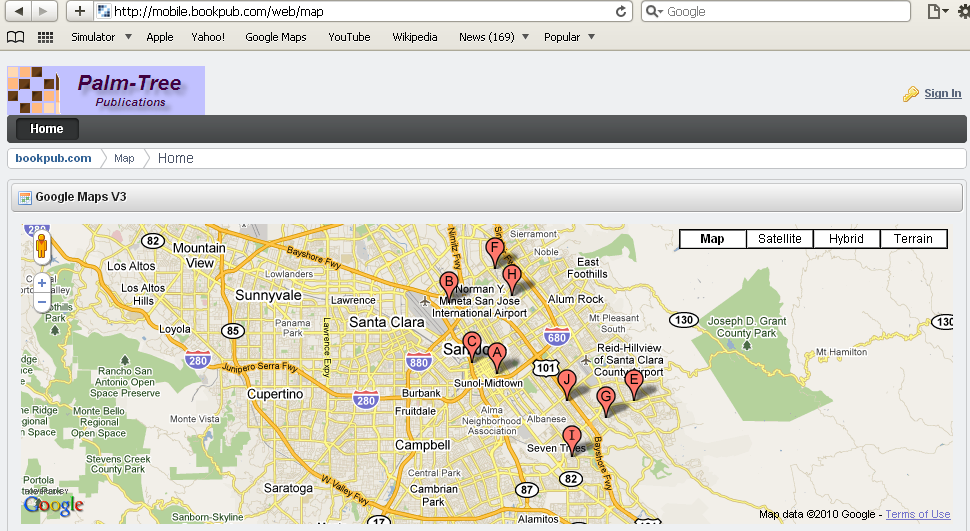
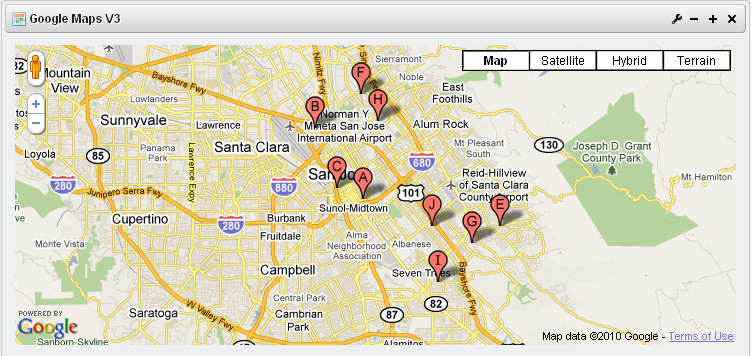
Based on above steps, you can build a portlet called Google Maps V3 for both WEB and WAP in following steps.
- Using HTML5 DOCTYPE in the theme (either WEB or WAP theme), like Classic theme (WEB) in Liferay 6.
- Adding DOM <DIV> and JavaScript in view pages of the portlet Google Maps V3.
That's it. Is it so easy?
What’s next?
Google Maps JavaScript API V3 provides a lot of features like:
- Events
- Controls
- Overlays
- Services
- Map Types
It would be nice that the portlet Google Maps V3 could merge above features in one place and, moreover, end users could customize their maps easily.
Your comments / suggestions?
Related Assets...
More Blog Entries...